
Master Play Casino Login & Sign Up Guide
Let’s start from the top: your MasterPlay account is your control centre for everything, from login and security to bonuses, Cashback and MasterPoints. You use one MasterPlay login to access slots, live casino, crash, virtual sports and every other category on the site, with balances and rewards shared across them.
You will always see quick links in the footer to Terms & Conditions, Bonus Terms, Withdrawal Policy, KYC Policy and Responsible Gaming. That means whenever you are not sure about verification, promo limits or withdrawal rules, you are two clicks away from the full official version.
Creating a New Account
Here is the thing: registration at MasterPlay takes a couple of minutes, and you only do it once. After that, your login works on desktop and mobile, and you can start claiming promos like the 150% welcome bonus and Wednesday Reload.
We only ask for the info we actually need to set up your profile and later verify it. The form handles basic validation for you, so you will know immediately if something is missing or mistyped.
Registration form
When you hit “Sign Up” in the top bar, a MasterPlay registration form opens where you enter your email, desired username, password and basic personal details (like name, date of birth and country). This information must be accurate because it is later matched against your KYC documents.
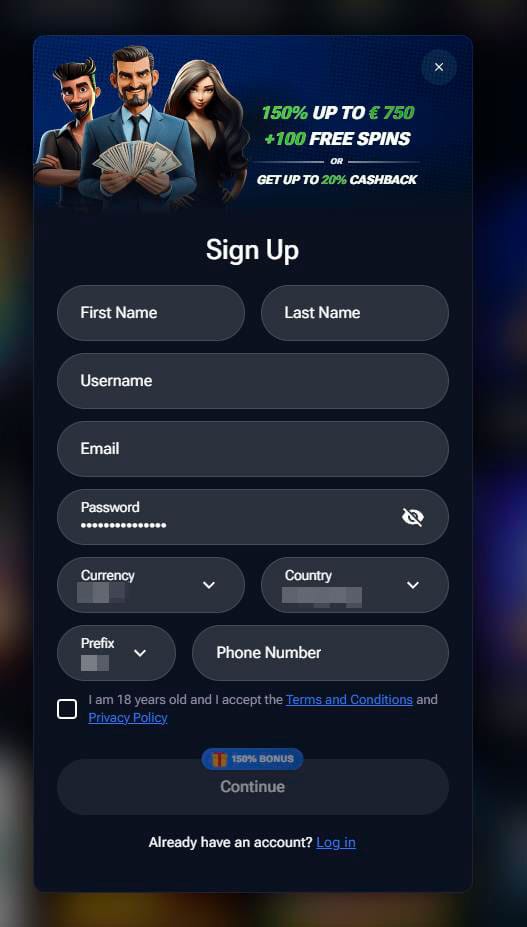
You also choose your account currency at this stage, which is used for your balances and bonuses. If you put something wrong, the form will show error messages such as “The email or username field is required,” so you can fix it before proceeding.
Accepting Terms, Bonus Policy and responsible gaming notices
Before you confirm the account, you tick boxes confirming that you are of legal age and that you agree to our Terms & Conditions, Bonus Terms and relevant policy pages. Those include details like how wagering works, max win limits on promotions, how withdrawals are processed and what counts as bonus abuse or irregular play.
You also get exposure to Responsible Gaming info via a dedicated page linked in the footer, explaining tools like limits and self‑exclusion. Accepting these policies is not just bureaucracy; it is what allows you to use the platform and ensures you are aware that gambling is meant as entertainment, not a way to make a guaranteed profit.
Logging In on Desktop and Mobile
Now that you have an account, logging in is the easy part. The login box is always available on the main navigation, so you do not waste time hunting it down when you want to continue where you left off.
You can log in from any modern browser on desktop or mobile. If you bounce between laptop and phone, your account data stays the same everywhere: balances, bonuses, Cashback, MasterPoints and history all sit on one profile, not multiple versions.
Logging in via desktop
On a desktop, click “Log In,” and you will see a compact form asking for your email or username and password. The fields are clearly labelled, and if you try to submit without filling something in, you will see prompts like “The Email or username field is required,” so you know exactly what needs fixing before you can continue.
Once the credentials are correct, you are taken back into the lobby or the page you were on previously. From there, you can open the cashier to deposit or withdraw, browse promotions, check your bonus progress or go directly into categories like Slots, Live or Crash games without having to re‑enter your details again in that session.

Mobile login
On mobile, the same login form appears either under a top‑bar “Log In” button or via the mobile menu, depending on your screen size. You input the same email/username and password and hit the button to enter your account, with validation working the same way as on desktop if you miss a field.
You can also add MasterPlay to your phone’s home screen using the “Install app on your phone” option, which creates an app‑like shortcut to the site so you can launch it with one tap. After login, the mobile lobby gives you full access to promos, balance, game categories and support options just like desktop, but optimised for touch, quick scrolling and smaller screens so you can move between games and the cashier without any pinch‑zoom gymnastics.
Account Security and Verification
Account security is where we get a bit protective on your behalf. Your MasterPlay login is the key to your money, your personal data and your long promo history, so we put a lot of effort into keeping that key safe with a mix of password rules, device checks, KYC and internal monitoring.
Security also ties directly into withdrawals: until some checks are complete, payouts can be limited, delayed or paid in smaller chunks. Once your account is fully verified and your usual patterns look stable, future cashouts tend to move much more smoothly and with fewer manual reviews.
Password rules, changing credentials and session control
When you create your password, the system expects something strong enough not to be guessable by a friend or a bot. Best practice is at least 8–10 characters, mixing upper‑ and lower‑case letters, numbers and symbols, and avoiding obvious picks like names, birthdays or “123456”.
After you are registered, you can change your password from your profile settings any time you want, especially if you once logged in on a shared device or think someone saw you typing it. On the back end, our systems track device and session signals around logins, deposit attempts and repeated failed password entries, and may force re‑logins, show extra checks or auto‑end a session if something looks off or you have been idle for a while.
If we detect very unusual behaviour, like logging in to MasterPlay from strange locations or rapid‑fire failed attempts, we may temporarily lock the account and ask you to reset the password or provide extra proof that it is really you. It can feel strict in the moment, but it is there to stop anyone from walking off with your balance or misusing your promos.
Identity verification (KYC), requested documents and limits
The KYC Policy spells out what documents we can ask for: typically a government‑issued photo ID (passport, ID card or driving licence), a proof of address such as a recent utility bill or bank statement, and, when needed, proof of payment method like a screenshot of an e‑wallet or a photo of your card with most digits hidden.
These checks are required by our license in Anjouan and anti‑money‑laundering rules, not just by internal policy. Until KYC is done, withdrawals may be capped, slowed down or manually reviewed, and we may ask follow‑up questions if your play pattern, deposit behaviour or device footprint looks unusual compared to your normal activity.
Once MasterPlay verification is complete and your profile is marked as fully checked, future withdrawals usually need fewer manual steps and go through quicker, unless something major changes like new payment methods, very large wins or updated regulations. If we ever need new documents because something expired or your details changed, you will see this via notifications or hear it from support before any payment is declined.
Recovering Access to Your Account
Sometimes you just blank on your password or mistype it too often. That is normal, and there is a built‑in recovery process to help you get back in without creating a new account or breaking any rules.
If the issue is more serious, like a block, self‑exclusion or suspected compromise, the support team becomes your go‑to. Either way, there is always a route back; it just depends on why you are locked out and what the Terms & Conditions allow in your specific case.
Forgot password flow and email reset link
If you forget your password, click the “Forgot password?” link under the login fields. You then enter the email address tied to your MasterPlay account, and we send a password reset link to that inbox so only the real owner of the email can change credentials.
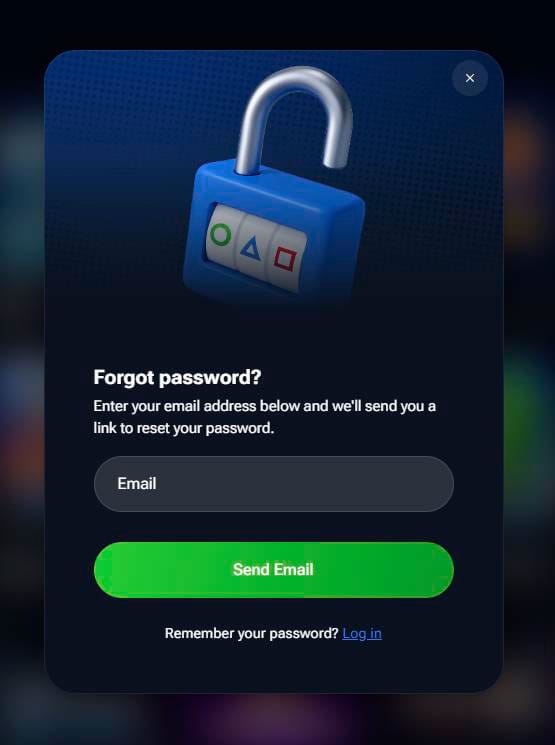
You open the email, click the link, set a new password, and then log in as usual. For safety, the reset link is time‑limited and single‑use, so if you do not use it quickly or click it multiple times, you may need to request a fresh one; also, always check spam/promotions folders and make sure you did not mistype your email before contacting support.
Locked, excluded or self‑excluded accounts
If your account is locked, there could be several reasons: too many failed MasterPlay login attempts, security checks, KYC issues, responsible gaming flags or an active self‑exclusion. When you self‑exclude through the Responsible Gaming tools, the account is intentionally blocked from login until the exclusion period ends, even if you later change your mind.
In these cases, entering the correct password will not fix it; you need to contact support via live chat or email so they can look up your account status and explain the next steps, which might include sending documents or simply waiting out an exclusion period. For self‑exclusions linked to problem gambling, early re‑activation is usually not allowed, in line with our duty of care and policy commitments, and you may be pointed toward additional help resources on the Responsible Gaming page if you need support.
Inside Your Personal Area
Once you are logged in, your personal area is where you actually see what is going on with your money and rewards. Think of it as your control panel for balances, transactions, promos, Cashback and MasterPoints, with each section clearly labelled in the account menu.
Even when the site design is updated, the core sections stay easy to find: wallet balances, deposit/withdraw buttons, transaction history and rewards dashboards. This is also where you can tweak some basic settings, see system notifications, track targeted offers and sometimes access direct links to KYC or security checks when they are needed.
Balances, deposits/withdrawals and transaction history sections
Your wallet typically shows at least two key balances: Real Money and Bonus, so you always know how much you can withdraw instantly and how much is still tied to wagering. In addition, you might see separate indicators for Cashback or MasterPoints when they are relevant, often with small info icons you can click for more details.
From your account, you can enter the cashier to make a new deposit, choose a withdrawal method or check the status of pending payouts. A transaction or history section lets you review previous deposits, withdrawals and sometimes bonus credits, which is useful if you want to confirm when you last claimed a promo, how often you have cashed out recently or whether a specific payment method has already been used.
Master Points, Cashback and bonus status in the account menu
The MasterPoints page shows how many points you have already earned and clearly explains how conversion works: every 100 MasterPoints converts to about €1 in real cash, and only full hundreds can be exchanged at once. Any leftover points stay in your balance, so if you have 270 MasterPoints, you can cash out 200 for €2, and the remaining 70 keep building toward your next conversion, with a simple bar or counter showing your progress.
The Cashback section displays your VIP level (Bronze, Silver, Gold, Platinum, Diamond), your net spend tracked for Cashback and the amount you can currently claim, subject to conditions like no pending withdrawals and a low current balance. You also see your active bonuses, their wagering progress, remaining rollover and any maximum win limit tied to them, which is crucial before you click “Withdraw” so you know whether claiming now will forfeit bonus funds or whether it is smarter to finish wagering first.

Login & Registration FAQ
No, our Terms allow only one account per person, household, IP address and payment method; creating multiple profiles to grab extra bonuses or bypass limits can lead to all related accounts being closed and bonuses or winnings being confiscated.
You never have to accept promotions if you do not want to; accepting Terms & Conditions and Bonus Terms is required to use the site, but you can leave bonus boxes unticked at the cashier and play with pure real money instead.
Under our KYC Policy and license from Anjouan, we must verify your identity, age and sometimes your payment methods before releasing funds, especially for higher sums or unusual activity; this helps prevent fraud and protects both you and the casino.
Change your password immediately via the profile section if you can still log in, then contact live chat or email support so they can review your recent activity, lock suspicious sessions and possibly ask for extra MasterPlay verification before allowing future withdrawals.
You can easily update some details like your password and sometimes your phone number inside the account settings, but core identifiers like email or currency may require manual review by support and may not be changeable after you have deposited, due to security and anti‑fraud rules.
During an active self‑exclusion period, you will not be able to log in, deposit or play; the block is intentional and cannot usually be lifted early, in line with our Responsible Gaming and KYC policies.
Automatic logouts can happen after periods of inactivity or if our systems detect unusual session behaviour or device changes, which helps protect your account from unauthorised access and keeps your login data safer.
First, check your spam or promotions folder and make sure you entered the correct email; if the message still does not show up after a few minutes, request a new reset link and contact live chat or email support so they can double‑check your account details and email status.